Security
Security is part of the workflow — not an add-on.
The operating model is observable in the interactive demo; access controls are exercised in the security test suite.
The controls09
Nine controls, written as facts.
Access follows assignment
A staff member sees the clients they are actively assigned to. Others are not listed, do not appear in search, and cannot be opened by typing the address. A record somebody may not reach is reported as not found rather than forbidden — because 'forbidden' would confirm the person exists. Ending an assignment removes access on the next request.
Three checks, not one
Every read passes an organisation check, a relationship check and a sensitivity check. Holding a permission is not access; it is permission to see the records you are related to. Hidden navigation is never the control — every page and every action re-checks on the server.
Individual accounts, by invitation
Invitation-only accounts: every person gets their own, and nobody shares a login. Two-factor enrollment ships with the operational portal before any client data is stored.
Private document delivery
Files are held in private storage and delivered through short-lived signed links, so a copied URL stops working. Every upload is hash-checked, size-limited and type-verified before anyone can open it, and blocked if it looks executable; a malware engine is on the roadmap.
Records that hold their shape
An approved case note locks: never edited, never deleted. Corrections are addenda, so the original stays exactly as written with its author and time. Clock events are append-only. Closed periods do not reopen.
Append-only audit history
Who did what, to which record, and when — including who opened a document and who ran an export. It cannot be tidied up afterwards, which is what makes it able to answer a review.
Message content stays behind authentication
Notification email tells somebody a message is waiting. It does not contain the message. Email is not a controlled surface.
Location only at clock in and clock out
Captured at those two moments and at no other time. There is no background tracking. A failed capture is recorded as a failed capture and does not block the clock — blocking would only lose the record of real work.
Browser-local portal help
The help panel answers from a table shipped with the page. Nothing typed into it leaves the browser, because there is no request to make.
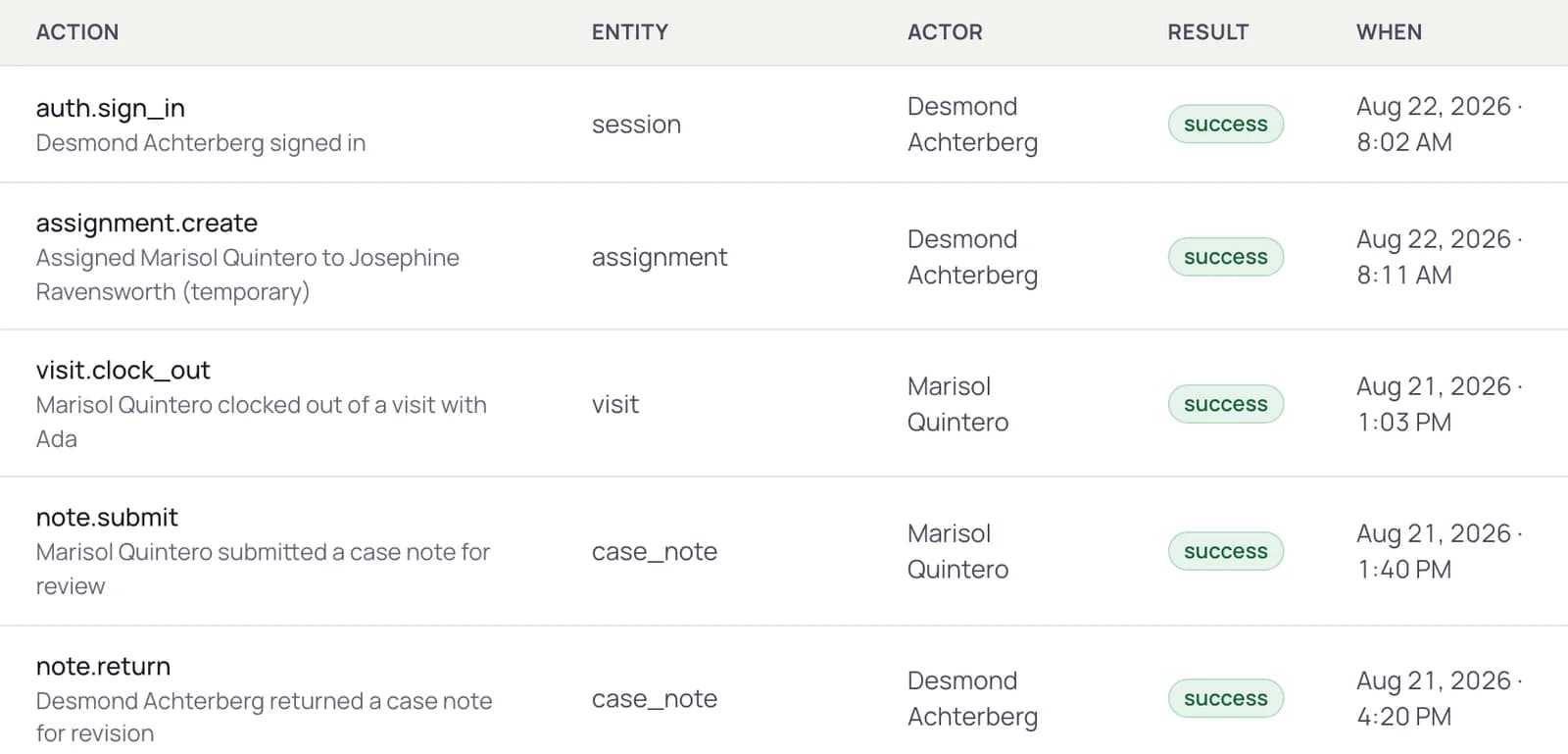
The history that answers a review.
Every action lands in an append-only history — sign-ins, views, edits, approvals, exports — with who, what, which record, and when. When a reviewer asks “who opened this file?”, the answer is a filter, not an investigation.
What we do not claim
No internet-connected system can guarantee absolute security, and we will not tell you otherwise. We are not certified or endorsed by any state agency. HIPAA obligations depend on your agency's arrangements and agreements — the platform is built to support them and cannot confer compliance on its own. Electronic visit verification workflows are supported and HHAeXchange configuration is held; we do not describe that as a completed integration.
Watch access appear and disappear, live.
In the demo, end an assignment and switch to the staff view — the client is gone from the list, from search, and from the address bar. That is the product, doing it.